-
210416_3~4(다차원배열,args인자값사용하기)JAVA(Sol)(정리대기중..언젠가) 2021. 4. 16. 13:10
int [ ][ ]a ; <=== 배열의 변수의 선언 int a [ ][ ] ; 가능함
int [ ][ ][ ] a ; <=== 3차원배열
[행][열] <=== 배열첨자 [면][행][열] <===3차원배열
new <=== heap(힙) 영역에 메모리 할당 <== 참고: 객체할당 영역 <== new 생성자()
int [ ][ ] a = new int[4][3] <======= 4*(4*3) 바이트 할당 // 한셀(칸)이 4바이트인 4행3열짜리 구조
[0,0] [0,1] [0,2]
[1,0] [1,1] [1,2]
[2,0] [2,1] [2,2] a[2][1] = 999; 초기화 할때 행열 좌표(인덱스 번호)처럼 사용하면 된다.
[3,0] [3,1] [3,2]
* 나머지 배열이 가지는 특징은 동일하다
*배열 ------->뒤에 반복문 나온다.
*2차배열---->이중반복문이 나온다
for (행크기) {
for (열크기) { 요소[행][열]}
}
package chapter6;

public class Two_Array {

	public static void main(String[] args) {
		int[][] m = { { 1, 2 }, { 3, 4 }, { 5, 6 } }; // 3행2열의 2차배열
		for (int i = 0; i < 3; i++) { // 바깥for문은 행의 크기
			for (int j = 0; j < 2; j++) { // 안쪽 for문은 열의 크기
				System.out.println("m[" + i + "]n[" + j + "]=" + +m[i][j]);
			}
		}

	}

}
int[][]m={{1,2},{3,4},{5,6}};
[1][2]
[3][4]
[5][6]
package chapter6;

public class MultiArray {

	public static void main(String[] args) {

		int[] arr1 = new int[3]; //3열짜리 배열을 만든다

		int[][] arr2; // 2차원배열 aar2를 선언
		arr2 = new int[2][3]; // 2행3열짜리 배열을 초기화

		System.out.println("arr1배열의 열의 수 : "+ arr1.length+"\n");
		System.out.println("arr2배열의 행의 수 :" + arr2.length + "\n");
		System.out.println("arr2배열의 1행의 열의 수 :" + arr2[0].length + "\n");// aar2[].length열의갯수
		System.out.println("arr2배열의 2행의 열의 수 :" + arr2[1].length + "\n");

	}

}
패키지 ===>폴더 와비슷하다(같다?)
클래스 안의 구성물 즉 변수들이나 메서드들은 모두 멤버라고 부른다.
클래스가 실행(메모리에 로드) 되면 인스턴스화 된다.
인스턴스화를 시키면 클래스 내부의 멤버를 호출할수있다.
인스턴스.변수 = 999; 저장
인스턴스.메서드() ; 처리
클래스를 실행한다는 의미는 즉 클래스 내부의 멤버를 호출하는 것을 말한다.
cpu / 메모리 / 하드 <===물리적 장치
프로세서 프로세스 프로그램
--------------------------------------------------객체입장에서보면
변수,메서드 인스턴스 프로그램소스 <===프로그램입장
실행 -----> 저장 ------>종료
프로그래머는 물리적 장치 안에서 실행되는 코드를 짜는 사람을 말한다.
#### cmd에서 돌릴때 컴파일이 안되서 찾아봄
코드를 메모장에 저장할때 인코딩부분을 Ansi로 바꿔줬더니 해결됨###
package testjava;

public class ArgsTest {

	public static void main(String[] args) {
		// TODO Auto-generated method stub

		System.out.println("첫번째:");
		System.out.println(args[0]);

		System.out.println("본봉:");
		System.out.println(args[1]);

		System.out.println("세금:");
		System.out.println(args[2]);


	}

}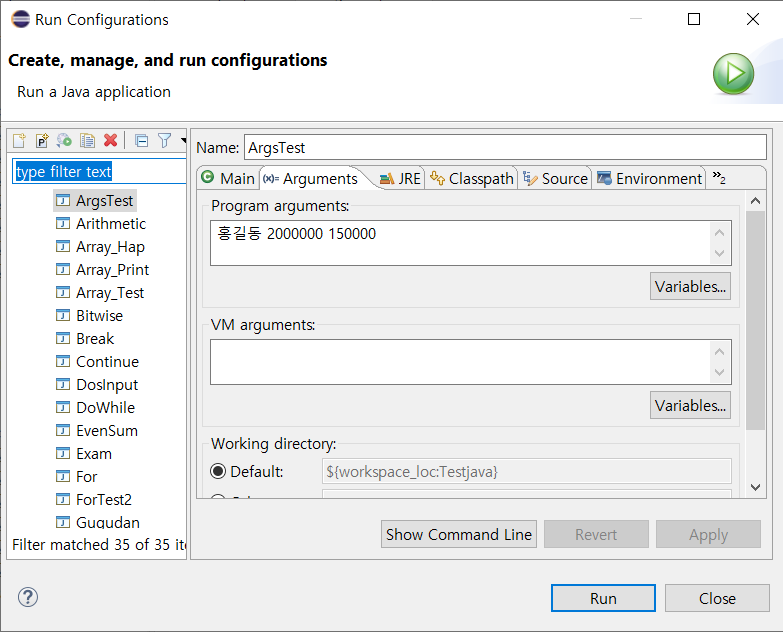
첫번째:
홍길동
본봉:
2000000
세금:
150000
package chapter6;

import java.text.DecimalFormat; //외부클래스 참조(import)

public class DosInput {

	public static void main(String[] args) { // 메인함수가 실행할때 문자열로된변수(args)가 여러개들어올수있다 args--->매개변수

		DecimalFormat comma = new DecimalFormat("###,##0"); // 숫자 세번째단위마다,를 찍어준다
		String cs1;
		String cs2;

		String s1 = args[0];

		int i1 = Integer.parseInt(args[1]); // Integer.parseInt --->정수로해석하시오
		cs1 = comma.format(i1);

		int i2 = Integer.parseInt(args[2]);
		cs2 = comma.format(i2);

		System.out.println("args.length : " + args.length);
		System.out.println("성명 : " + s1);
		System.out.println("급여 : " + cs1);
		System.out.println("세금 : " + cs2);
		System.out.println("실수령액 : " + comma.format(i1 - i2));

	}

}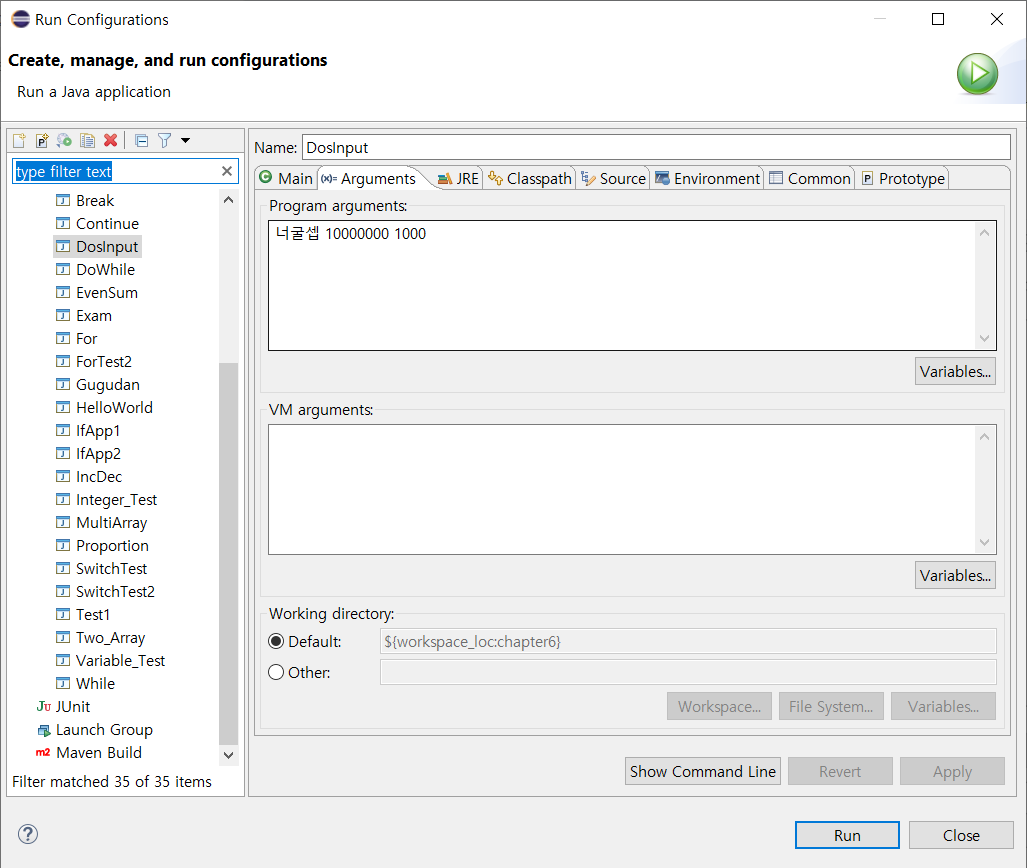
프로그램 시작시 인자들을 부여 하기
명령창(cmd)에서 arguments 부여하기
>java Dosinput 너굴셉 10000000 1000
args.length3
성명 : 너굴셉
급여 : 10,000,000
세금 : 1,000
실수령액 : 9,999,000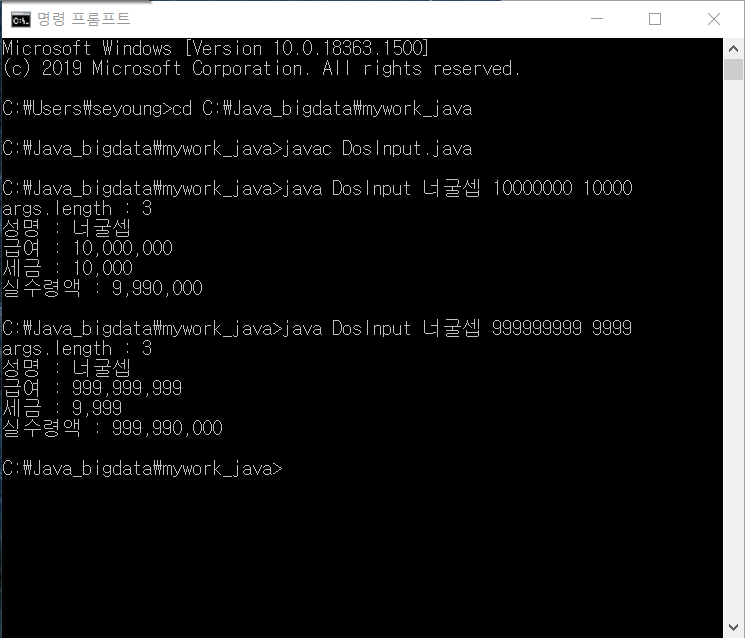
'JAVA(Sol)(정리대기중..언젠가)' 카테고리의 다른 글
210416_6(클래스class) (0) 2021.04.16 210416_5(클래스class) (0) 2021.04.16 210415_7~210416_1~2(array,배열) (0) 2021.04.15 210415_1 (switch문, ||&&논리연산자) (복구성공) (0) 2021.04.15 210415_3~6(중첩반복문,outer,continue,별만들기연습) (0) 2021.04.15